4.12. 异步数据复制
在第 3.2.5 节的基础上,本节提供了在 GPU 内存层次结构中进行异步数据移动的详细指导和示例。本节涵盖用于逐元素复制的 LDGSTS、用于批量(一维和多维)传输的张量内存加速器(TMA),以及用于从寄存器复制到分布式共享内存的 STAS,并展示这些机制如何与异步屏障和流水线集成。
4.12.1. 使用 LDGSTS
许多 CUDA 应用程序需要频繁地在全局内存与共享内存之间移动数据。这通常涉及复制较小的数据元素,或执行不规则的内存访问模式。LDGSTS(计算能力 8.0 及以上,参见PTX 文档)的主要目标是为较小的逐元素数据传输提供一种从全局内存到共享内存的高效异步数据传输机制,同时通过重叠执行来提高计算资源的利用率。
尺寸。LDGSTS 支持复制 4、8 或 16 字节。复制 4 或 8 字节时始终采用所谓的 L1 ACCESS 模式,在这种情况下,数据也会缓存在 L1 中;而复制 16 字节则允许启用 L1 BYPASS 模式,在这种情况下不会污染 L1。
源和目标。使用 LDGSTS 的异步复制操作仅支持从全局内存到共享内存这一方向。指针需要根据所复制数据的大小对齐到 4、8 或 16 字节。当共享内存和全局内存均按 128 字节对齐时,可以获得最佳性能。
异步性。使用 LDGSTS 的数据传输是异步的,并被建模为异步线程操作(参见异步线程与异步代理)。这允许发起线程在硬件异步复制数据时继续计算。数据传输在实际中是否异步发生取决于硬件实现,并且未来可能发生变化。
LDGSTS 必须在操作完成时发出信号。LDGSTS 可以使用共享内存屏障或流水线作为提供完成信号的机制。默认情况下,每个线程只等待自己的 LDGSTS 复制。因此,如果使用 LDGSTS 预取将与其他线程共享的数据,则在与 LDGSTS 完成机制同步之后,还必须执行__syncthreads()。
方向 |
异步复制(LDGSTS,计算能力 8.0 及以上) |
||
|---|---|---|---|
源 |
目标 |
完成机制 |
API |
全局内存 |
全局内存 |
||
shared::cta |
全局内存 |
||
全局内存 |
shared::cta |
共享内存屏障、流水线 |
|
全局内存 |
shared::cluster |
||
shared::cluster |
shared::cta |
||
shared::cta |
shared::cta |
||
在以下各节中,我们将通过示例演示如何使用 LDGSTS,并解释不同 API 之间的区别。
4.12.1.1. 在条件代码中批量执行加载
在这个模板计算示例中,线程块的第一个线程束负责从中心区域以及左右两侧的边界扩展区集体加载所有所需数据。使用同步复制时,由于代码具有条件分支,编译器可能会选择生成一系列从全局内存加载(LDG)、向共享内存存储(STS)的指令,而不是先执行 3 条 LDG 再执行 3 条 STS,后者才是加载数据以隐藏全局内存延迟的最佳方式。
__global__ void stencil_kernel(const float *left, const float *center, const float *right)
{
    // Left halo (8 elements) - center (32 elements) - right halo (8 elements)
    __shared__ float buffer[8 + 32 + 8];
    const int tid = threadIdx.x;

    if (tid < 8) {
        buffer[tid] = left[tid]; // Left halo
    } else if (tid >= 32 - 8) {
        buffer[tid + 16] = right[tid]; // Right halo
    }
    if (tid < 32) {
      buffer[tid + 8] = center[tid]; // Center
    }
    __syncthreads();

    // Compute stencil
}
为确保以最佳方式加载数据,我们可以将同步内存复制替换为直接从全局内存向共享内存加载数据的异步复制。这不仅通过将数据直接复制到共享内存来减少寄存器用量,还能确保所有从全局内存加载的操作都处于进行中。
#include <cooperative_groups.h>
#include <cuda/barrier>

__global__ void stencil_kernel(const float *left, const float *center, const float *right)
{
    auto block = cooperative_groups::this_thread_block();
    auto thread = cooperative_groups::this_thread();
    using barrier_t = cuda::barrier<cuda::thread_scope_block>;
    __shared__ barrier_t barrier;
    __shared__ float buffer[8 + 32 + 8];

    // Initialize synchronization object.
    if (block.thread_rank() == 0) {
        init(&barrier, block.size());
    }
    __syncthreads();

    // Version 1: Issue the copies in individual threads.
    if (tid < 8) {
        cuda::memcpy_async(buffer + tid, left + tid, cuda::aligned_size_t<4>(sizeof(float)), barrier); // Left halo
        // or cuda::memcpy_async(thread, buffer + tid, left + tid, cuda::aligned_size_t<4>(sizeof(float)), barrier);
    } else if (tid >= 32 - 8) {
        cuda::memcpy_async(buffer + tid + 16, right + tid, cuda::aligned_size_t<4>(sizeof(float)), barrier); // Right halo
        // or cuda::memcpy_async(thread, buffer + tid + 16, right + tid, cuda::aligned_size_t<4>(sizeof(float)), barrier);
    }
    if (tid < 32) {
        cuda::memcpy_async(buffer + 40, right + tid, cuda::aligned_size_t<4>(sizeof(float)), barrier); // Center
        // or cuda::memcpy_async(thread, buffer + 40, right + tid, cuda::aligned_size_t<4>(sizeof(float)), barrier);
    }

    // Version 2: Cooperatively issue the copies across all threads.
    cuda::memcpy_async(block, buffer, left, cuda::aligned_size_t<4>(8 * sizeof(float)), barrier); // Left halo
    cuda::memcpy_async(block, buffer + 8, center, cuda::aligned_size_t<4>(32 * sizeof(float)), barrier); // Center
    cuda::memcpy_async(block, buffer + 40, right, cuda::aligned_size_t<4>(8 * sizeof(float)), barrier); // Right halo

    // Wait for all copies to complete.
    barrier.arrive_and_wait();
    __syncthreads();

    // Compute stencil
}
|
#include <cooperative_groups.h>
#include <cooperative_groups/memcpy_async.h>

namespace cg = cooperative_groups;

__global__ void stencil_kernel(const float *left, const float *center, const float *right)
{
    cg::thread_block block = cg::this_thread_block();
    // Left halo (8 elements) - center (32 elements) - right halo (8 elements).
    __shared__ float buffer[8 + 32 + 8];

    // Cooperatively issue the copies across all threads.
    cg::memcpy_async(block, buffer, left, 8 * sizeof(float)); // Left halo
    cg::memcpy_async(block, buffer + 8, center, 32 * sizeof(float)); // Center
    cg::memcpy_async(block, buffer + 40, right, 8 * sizeof(float)); // Right halo
    cg::wait(block); // Waits for all copies to complete.
    __syncthreads();

    // Compute stencil.
}
|
#include <cuda_pipeline.h>

__global__ void stencil_kernel(const float *left, const float *center, const float *right)
{
    // Left halo (8 elements) - center (32 elements) - right halo (8 elements).
    __shared__ float buffer[8 + 32 + 8];
    const int tid = threadIdx.x;

    if (tid < 8) {
        __pipeline_memcpy_async(buffer + tid, left + tid, sizeof(float)); // Left halo
    } else if (tid >= 32 - 8) {
        __pipeline_memcpy_async(buffer + tid + 16, right + tid, sizeof(float)); // Right halo
    }
    if (tid < 32) {
        __pipeline_memcpy_async(buffer + tid + 8, center + tid, sizeof(float)); // Center
    }
    __pipeline_commit();
    __pipeline_wait_prior(0);
    __syncthreads();

    // Compute stencil.
}
|
针对cuda::barrier的cuda::memcpy_async重载支持使用异步屏障同步异步数据传输。此重载在执行复制操作时,仿佛该操作由绑定到屏障的另一个线程执行:在创建时增加当前阶段的预期计数,并在复制操作完成时减少该计数,使得只有在参与屏障的所有线程均已到达,并且绑定到屏障当前阶段的所有memcpy_async均已完成时,barrier的阶段才会推进。我们使用一个线程块范围的barrier,块中的所有线程均参与其中,并使用arrive_and_wait将屏障的到达与等待合并,因为我们在这些阶段之间不执行任何工作。
请注意,我们既可以使用线程级复制(版本 1),也可以使用集体复制(版本 2)来获得相同结果。在版本 2 中,API 会自动处理底层如何执行复制。在两个版本中,我们都使用cuda::aligned_size_t<4>()告知编译器数据按 4 字节对齐,且要复制的数据大小是 4 的倍数,以便启用 LDGSTS。请注意,为了与cuda::barrier互操作,此处使用的是cuda/barrier头文件中的cuda::memcpy_async。
cooperative_groups::memcpy_async实现在线程块的所有线程之间集体协调内存传输,但使用cg::wait(block)而不是显式屏障操作来同步完成。
基于低级原语的实现使用__pipeline_memcpy_async()发起逐元素内存传输,使用__pipeline_commit()提交这一批复制,并使用__pipeline_wait_prior(0)等待流水线中的所有操作完成。这提供了最直接的控制,但与更高级别的 API 相比,代价是代码更加冗长。它还确保底层会使用 LDGSTS,而更高级别的 API 并不提供这一保证。
注意
在此示例中,cooperative_groups::memcpy_async API 的效率低于其他 API,因为它会在每次复制操作启动后立即自动提交该操作,从而无法像其他 API 那样,通过在一次提交操作之前批量执行多次复制来进行优化。
4.12.1.2. 预取数据
在此示例中,我们将演示如何使用异步数据复制将数据从全局内存预取到共享内存。在迭代式复制与计算模式中,这允许利用当前迭代的计算隐藏未来迭代的数据传输延迟,从而有可能增加正在传输的字节数。
#include <cooperative_groups.h>
#include <cuda/pipeline>

template <size_t num_stages = 2 /* Pipeline with num_stages stages */>
__global__ void prefetch_kernel(int* global_out, int const* global_in, size_t size, size_t batch_size) {
    auto grid = cooperative_groups::this_grid();
    auto block = cooperative_groups::this_thread_block();
    auto thread = cooperative_groups::this_thread();
    assert(size == batch_size * grid.size()); // Assume input size fits batch_size * grid_size

    extern __shared__ int shared[]; // num_stages * block.size() * sizeof(int) bytes
    size_t shared_offset[num_stages];
    for (int s = 0; s < num_stages; ++s) shared_offset[s] = s * block.size();

    cuda::pipeline<cuda::thread_scope_thread> pipeline = cuda::make_pipeline();

    auto block_batch = [&](size_t batch) -> int {
        return block.group_index().x * block.size() + grid.size() * batch;
    };

    // Fill the pipeline with the first ``num_stages`` batches.
    for (int s = 0; s < num_stages; ++s) {
        pipeline.producer_acquire();
        cuda::memcpy_async(shared + shared_offset[s] + tid, global_in + block_batch(s) + tid, cuda::aligned_size_t<4>(sizeof(int)), pipeline);
        pipeline.producer_commit();
    }

    int stage = 0;

    // compute_batch: next batch to process
    // fetch_batch:   next batch to fetch from global memory
    for (size_t compute_batch = 0, fetch_batch = num_stages; compute_batch < batch_size; ++compute_batch, ++fetch_batch) {
        // Wait for the first requested stage to complete.
        constexpr size_t pending_batches = num_stages - 1;
        cuda::pipeline_consumer_wait_prior<pending_batches>(pipeline);
        __syncthreads(); // Not required if each thread works on the data it copied.

        // Compute on the current batch
        compute(global_out + block_batch(compute_batch) + tid, shared + shared_offset[stage] + tid);

        // Release the current stage.
        pipeline.consumer_release();
        __syncthreads(); // Not required if each thread works on the data it copied.

        // Load future stage ``num_stages`` ahead of current compute batch.
        pipeline.producer_acquire();
        if (fetch_batch < batch_size) {
            cuda::memcpy_async(shared + shared_offset[stage] + tid, global_in + block_batch(fetch_batch) + tid, cuda::aligned_size_t<4>(sizeof(int)), pipeline);
        }
        pipeline.producer_commit();
        stage = (stage + 1) % num_stages;
    }
}
|
#include <cooperative_groups.h>
#include <cooperative_groups/memcpy_async.h>

namespace cg = cooperative_groups;

template <size_t num_stages = 2 /* Pipeline with num_stages stages */>
__global__ void prefetch_kernel(int* global_out, int const* global_in, size_t size, size_t batch_size) {
    auto grid = cooperative_groups::this_grid();
    auto block = cooperative_groups::this_thread_block();
    assert(size == batch_size * grid.size()); // Assume input size fits batch_size * grid_size

    extern __shared__ int shared[]; // num_stages * block.size() * sizeof(int) bytes
    size_t shared_offset[num_stages];
    for (int s = 0; s < num_stages; ++s) shared_offset[s] = s * block.size();

    cuda::pipeline<cuda::thread_scope_thread> pipeline = cuda::make_pipeline();

    auto block_batch = [&](size_t batch) -> int {
        return block.group_index().x * block.size() + grid.size() * batch;
    };

    // Fill the pipeline with the first ``num_stages`` batches.
    for (int s = 0; s < num_stages; ++s) {
        size_t block_batch_idx = block_batch(s);
        cg::memcpy_async(block, shared + shared_offset[s], global_in + block_batch_idx, cuda::aligned_size_t<4>(sizeof(int));
    }

    int stage = 0;

    // compute_batch: next batch to process
    // fetch_batch:   next batch to fetch from global memory
    for (size_t compute_batch = 0, fetch_batch = num_stages; compute_batch < batch_size; ++compute_batch, ++fetch_batch) {
        // Wait for the first requested stage to complete.
        size_t pending_batches = (fetch_batch < batch_size - num_stages) ? num_stages - 1 : batch_size - fetch_batch - 1;
        cg::wait_prior(pending_batches);
        __syncthreads(); // Not required if each thread works on the data it copied.

        // Compute on the current batch.
        compute(global_out + block_batch(compute_batch) + tid, shared + shared_offset[stage] + tid);

        __syncthreads(); // Not required if each thread works on the data it copied.

        // Load future stage ``num_stages`` ahead of current compute batch.
        size_t fetch_batch_idx = block_batch(fetch_batch);
        if (fetch_batch < batch_size) {
            cg::memcpy_async(block, shared + shared_offset[stage], global_in + block_batch(fetch_batch), cuda::aligned_size_t<4>(sizeof(int)) * block.size());
        }
        stage = (stage + 1) % num_stages;
    }
}
|
#include <cooperative_groups.h>
#include <cuda_awbarrier_primitives.h>

template <size_t num_stages = 2 /* Pipeline with num_stages stages */>
__global__ void prefetch_kernel(int* global_out, int const* global_in, size_t size, size_t batch_size) {
    auto grid = cooperative_groups::this_grid();
    auto block = cooperative_groups::this_thread_block();
    assert(size == batch_size * grid.size()); // Assume input size fits batch_size * grid_size

    extern __shared__ int shared[]; // num_stages * block.size() * sizeof(int) bytes
    size_t shared_offset[num_stages];
    for (int s = 0; s < num_stages; ++s) shared_offset[s] = s * block.size();

    auto block_batch = [&](size_t batch) -> int {
        return block.group_index().x * block.size() + grid.size() * batch;
    };

    // Fill the pipeline with the first ``num_stages`` batches.
    for (int s = 0; s < num_stages; ++s) {
        __pipeline_memcpy_async(shared + shared_offset[s] + tid, global_in + block_batch(s)+ tid, cuda::aligned_size_t<4>(sizeof(int)));
        __pipeline_commit();
    }

    // compute_batch: next batch to process
    // fetch_batch:   next batch to fetch from global memory
    for (size_t compute_batch = 0, fetch_batch = num_stages; compute_batch < batch_size; ++compute_batch, ++fetch_batch) {
        // Wait for the first requested stage to complete.
        constexpr size_t pending_batches = num_stages - 1;
        __pipeline_wait_prior<pending_batches>();
        __syncthreads(); // Not required if each thread works on the data it copied.

        // Compute on the current batch.
        compute(global_out + block_batch(compute_batch) + tid, shared + shared_offset[stage] + tid);

        __syncthreads(); // Not required if each thread works on the data it copied.

        // Load future stage ``num_stages`` ahead of current compute batch.
        if (fetch_batch < batch_size) {
            __pipeline_memcpy_async(shared + shared_offset[stage] + tid, global_in + block_batch(fetch_batch) + tid, cuda::aligned_size_t<4>(sizeof(int)));
        }
        __pipeline_commit();
        stage = (stage + 1) % num_stages;
    }
}
|
cuda::memcpy_async实现演示了借助cuda::memcpy_async,使用cuda::pipeline(参见流水线)进行多阶段数据预取。它:
初始化一个线程局部的流水线。
通过调度
num_stages个memcpy_async操作来启动流水线。遍历所有批次:阻塞所有线程,直到当前批次完成,然后对当前批次执行计算,最后调度下一个
memcpy_async(如果还有)。
cooperative_groups::memcpy_async实现演示了使用cooperative_groups::memcpy_async进行多阶段数据预取。与前一种实现的主要区别在于,我们不使用流水线对象,而是依靠cooperative_groups::memcpy_async在底层分阶段调度内存传输。
CUDA C 原语实现以与第一种实现非常相似的方式,演示了使用低级原语进行多阶段数据预取。
在此示例中,实现高效代码生成的一个重要细节是,即使没有更多批次需要获取,也要在流水线中保持num_stages个批次。实现方法是,即使没有更多批次需要获取,也向流水线提交(pipeline.producer_commit()或__pipeline_commit())。注意,使用协作组 API 无法做到这一点,因为我们无法访问内部流水线。
4.12.1.3. 通过线程束专门化实现生产者-消费者模式
在此示例中,我们将演示如何实现一种生产者-消费者模式:将单个线程束专门用作生产者,执行从全局内存到共享内存的异步数据复制,而其余线程束则消费共享内存中的数据并执行计算。为了使生产者线程与消费者线程能够并发执行,我们在共享内存中使用双缓冲。当消费者线程束处理一个缓冲区中的数据时,生产者线程束会异步地将下一批数据获取到另一个缓冲区中。
#include <cooperative_groups.h>
#include <cuda/pipeline>

#pragma nv_diag_suppress static_var_with_dynamic_init

using pipeline = cuda::pipeline<cuda::thread_scope_block>;

__device__ void produce(pipeline &pipe, int num_stages, int stage, int num_batches, int batch, float *buffer, int buffer_len, float *in, int N)
{
  if (batch < num_batches)
  {
    pipe.producer_acquire();
    /* copy data from in(batch) to buffer(stage) using asynchronous memory copies */
    cuda::memcpy_async(buffer + stage * buffer_len + threadIdx.x, in + batch * buffer_len + threadIdx.x, cuda::aligned_size_t<4>(sizeof(float)), pipe);
    pipe.producer_commit();
  }
}

__device__ void consume(pipeline &pipe, int num_stages, int stage, int num_batches, int batch, float *buffer, int buffer_len, float *out, int N)
{
  pipe.consumer_wait();
  /* consume buffer(stage) and update out(batch) */
  pipe.consumer_release();
}

__global__ void producer_consumer_pattern(float *in, float *out, int N, int buffer_len)
{
  auto block = cooperative_groups::this_thread_block();
  constexpr int warpSize = 32;

  /* Shared memory buffer declared below is of size 2 * buffer_len
     so that we can alternatively work between two buffers.
     buffer_0 = buffer and buffer_1 = buffer + buffer_len */
  __shared__ extern float buffer[];

  const int num_batches = N / buffer_len;

  // Create a partitioned pipeline with 2 stages where the first warp is the producer and the other warps are consumers.
  constexpr auto scope = cuda::thread_scope_block;
  constexpr int num_stages = 2;
  cuda::std::size_t producer_count = warpSize;
  __shared__ cuda::pipeline_shared_state<scope, num_stages> shared_state;
  pipeline pipe = cuda::make_pipeline(block, &shared_state, producer_count);

  // Producer fills the pipeline
  if (block.thread_rank() < producer_count)
    for (int s = 0; s < num_stages; ++s)
      produce(pipe, num_stages, s, num_batches, s, buffer, buffer_len, in, N);

  // Process the batches
  int stage = 0;
  for (size_t b = 0; b < num_batches; ++b)
  {
    if (block.thread_rank() < producer_count)
    {
      // Producers prefetch the next batch
      produce(pipe, num_stages, stage, num_batches, b + num_stages, buffer, buffer_len, in, N);
    }
    else
    {
      // Consumers consume the oldest batch
      consume(pipe, num_stages, stage, num_batches, b, buffer, buffer_len, out, N);
    }
    stage = (stage + 1) % num_stages;
  }
}
|
#include <cooperative_groups.h>
#include <cuda_awbarrier_primitives.h>

__device__ void produce(__mbarrier_t ready[], __mbarrier_t filled[], float *buffer, int buffer_len, float *in, int N)
{
  for (int i = 0; i < N / buffer_len; ++i)
  {
    __mbarrier_token_t token = __mbarrier_arrive(&ready[i % 2]); /* wait for buffer_(i%2) to be ready to be filled */
    while(!__mbarrier_try_wait(&ready[i % 2], token, 1000)) {}
    /* produce, i.e., fill in, buffer_(i%2)  */
    __pipeline_memcpy_async(buffer + i * buffer_len + threadIdx.x, in + i * buffer_len + threadIdx.x, cuda::aligned_size_t<4>(sizeof(float)));
    __pipeline_arrive_on(filled[i % 2]);
    __mbarrier_arrive(filled[i % 2]);  /* buffer_(i%2) is filled */
  }
}

__device__ void consume(__mbarrier_t ready[], __mbarrier_t filled[], float *buffer, int buffer_len, float *out, int N)
{
  __mbarrier_arrive(&ready[0]); /* buffer_0 is ready for initial fill */
  __mbarrier_arrive(&ready[1]); /* buffer_1 is ready for initial fill */
  for (int i = 0; i < N / buffer_len; ++i)
  {
    __mbarrier_token_t token = __mbarrier_arrive(&filled[i % 2]);
    while(!__mbarrier_try_wait(&filled[i % 2], token, 1000)) {}
    /* consume buffer_(i%2) */
    __mbarrier_arrive(&ready[i % 2]); /* buffer_(i%2) is ready to be re-filled */
  }
}

__global__ void producer_consumer_pattern(int N, float *in, float *out, int buffer_len)
{

  /* Shared memory buffer declared below is of size 2 * buffer_len
     so that we can alternatively work between two buffers.
     buffer_0 = buffer and buffer_1 = buffer + buffer_len */
  __shared__ extern float buffer[];

  /* bar[0] and bar[1] track if buffers buffer_0 and buffer_1 are ready to be filled,
     while bar[2] and bar[3] track if buffers buffer_0 and buffer_1 are filled-in respectively */
  __shared__ __mbarrier_t bar[4];

  // Initialize the barriers
  auto block = cooperative_groups::this_thread_block();
  if (block.thread_rank() < 4)
    __mbarrier_init(bar + block.thread_rank(), block.size());
  __syncthreads();

  if (block.thread_rank() < warpSize)
    produce(bar, bar + 2, buffer, buffer_len, in, N);
  else
    consume(bar, bar + 2, buffer, buffer_len, out, N);
}
|
cuda::memcpy_async实现通过cuda::memcpy_async和一个具有 2 个阶段的cuda::pipeline,演示了抽象层次最高的 API。它使用分区流水线(参见流水线),其中第一个线程束充当生产者,其余线程束充当消费者。生产者最初填充流水线的两个阶段。然后,在主处理循环中,当消费者处理当前批次时,生产者为后续批次获取数据,从而保持稳定的工作流。
基于原语的 CUDA C 原语实现将__pipeline_memcpy_async()与用作完成机制的共享内存屏障结合,以协调异步内存传输。__pipeline_arrive_on()函数将内存复制与屏障关联起来。它将屏障到达计数加一,当顺序排在它之前的所有异步操作都完成后,到达计数会自动减一,因此对到达计数的净影响为零。出于这一原因,我们还需要使用__mbarrier_arrive()显式到达屏障。
4.12.2. 使用张量内存加速器(TMA)
许多应用程序需要在全局内存与其他内存之间搬移大量数据。通常,数据在全局内存中以多维数组的形式布局,并采用非顺序的数据访问模式。为了减少全局内存访问,会先将此类数组的子分块复制到共享内存,再用于计算。加载和存储涉及的地址计算容易出错且重复繁琐。为了卸载这些计算,计算能力 9.0(Hopper)及更高版本(参见PTX 文档)具有张量内存加速器(TMA)。TMA 的主要目标是为多维数组提供从全局内存到共享内存的高效数据传输机制。
命名。张量内存加速器(TMA)是一个广义术语,用于指代本节描述的功能。为了实现前向兼容并减少与 PTX ISA 的差异,本节根据所使用的具体复制类型,将 TMA 操作称为批量异步复制或批量张量异步复制。使用“批量”一词是为了将这些操作与上一节描述的异步内存操作区分开来。
维度。TMA 支持复制一维数组和多维数组(最多 5 维)。一维连续数组的批量异步复制编程模型与多维数组的批量张量异步复制编程模型不同。要对多维数组执行批量张量异步复制,硬件需要一个张量映射。该对象描述多维数组在全局内存和共享内存中的布局。张量映射通常在主机上使用cuTensorMapEncode API创建,然后作为带有__grid_constant__注解的const核函数参数从主机传输到设备(参见__grid_constant__ 参数)。张量映射作为带有__grid_constant__注解的const核函数参数从主机传输到设备,并且可以在设备上用于在共享内存与全局内存之间复制一个数据分块。相比之下,对连续的一维数组执行批量异步复制不需要张量映射:只需提供指针和大小参数,即可在设备上执行。
源和目标。TMA 操作的源地址和目标地址可以位于共享内存或全局内存中。这些操作可以将数据从全局内存读取到共享内存,将数据从共享内存写入全局内存,还可以将数据从共享内存复制到同一簇中另一个线程块的分布式共享内存。此外,在簇中时,可以将批量异步张量操作指定为多播。在这种情况下,可以将数据从全局内存传输到簇内多个线程块的共享内存中。多播功能针对当前设备的全局内存访问进行了优化,也就是说,并非针对通过 NVLink 访问对等设备的情况,而且还针对PTX 多播目标 ISA 说明中列出的某些数据中心 GPU 目标架构进行了优化。在其他目标上,其可能出现性能显著降低的情况。因此,建议仅将其用于访问本地 GPU 上的全局内存,并且仅在具有PTX 多播目标 ISA 说明中所述推荐计算能力的 GPU 上使用。
异步性。使用 TMA 进行的数据传输是异步的,并被建模为异步代理操作(参见异步线程与异步代理)。这使发起线程可以在硬件异步复制数据的同时继续计算。数据传输在实践中是否异步发生取决于硬件实现,并且未来可能发生变化。批量异步操作可以使用多种完成机制来发出操作已完成的信号。当操作将数据从全局内存读取到共享内存时,线程块中的任何线程都可以通过等待共享内存屏障,来等待数据在共享内存中变得可读。当批量异步操作将数据从共享内存写入全局内存或分布式共享内存时,只有发起线程能够等待操作完成。这通过基于批量异步组的完成机制实现。下文和PTX ISA中提供了描述这些完成机制的表格。
方向 |
异步复制(TMA,计算能力 9.0 及更高版本) |
|
|---|---|---|
源 |
目标 |
完成机制 |
全局内存 |
全局内存 |
|
shared::cta |
全局内存 |
批量异步组 |
全局内存 |
shared::cta |
共享内存屏障 |
全局内存 |
shared::cluster |
共享内存屏障(多播) |
shared::cta |
shared::cluster |
共享内存屏障 |
shared::cta |
shared::cta |
|
4.12.2.1. 使用 TMA 传输一维数组
下表汇总了批量异步 TMA 可能的源内存空间、目标内存空间和完成机制,以及提供相应功能的 API。
方向 |
批量异步复制(TMA,计算能力 9.0 及更高版本) |
||
|---|---|---|---|
源 |
目标 |
完成机制 |
API |
全局内存 |
全局内存 |
||
shared::cta |
全局内存 |
批量异步组 |
|
全局内存 |
shared::cta |
共享内存屏障 |
cuda::memcpy_async、cuda::device::memcpy_async_tx、cuda::ptx::cp_async_bulk |
全局内存 |
shared::cluster |
共享内存屏障 |
|
shared::cta |
shared::cluster |
共享内存屏障 |
|
shared::cta |
shared::cta |
||
某些功能需要内联 PTX,目前这些功能通过CUDA Standard C++库中的cuda::ptx命名空间提供。可以使用以下代码检查这些封装的可用性:
#if defined(__CUDA_MINIMUM_ARCH__) && __CUDA_MINIMUM_ARCH__ < 900
static_assert(false, "Device code is being compiled with older architectures that are incompatible with TMA.");
#endif // __CUDA_MINIMUM_ARCH__
注意,如果源地址和目标地址均按 16 字节对齐,且大小为 16 字节的倍数,cuda::memcpy_async就会使用 TMA,否则会回退到同步复制。另一方面,cuda::device::memcpy_async_tx和cuda::ptx::cp_async_bulk始终使用 TMA,如果不满足这些要求,则会导致未定义行为。
下文通过一个示例演示如何使用批量异步复制。该示例对一维数组进行读取、修改和写回。核函数执行以下步骤:
初始化一个共享内存屏障,作为从全局内存到共享内存的批量异步复制的完成机制。
发起将一块内存从全局内存复制到共享内存的操作。
到达共享内存屏障并在该屏障上等待复制完成。
递增共享内存缓冲区中的值。
使用代理栅栏,确保共享内存写入(通用代理)对后续的批量异步复制(异步代理)可见。
发起将共享内存中的缓冲区复制到全局内存的批量异步复制。
等待批量异步复制完成对共享内存的读取。
#include <cuda/barrier>
#include <cuda/ptx>

using barrier = cuda::barrier<cuda::thread_scope_block>;
namespace ptx = cuda::ptx;

static constexpr size_t buf_len = 1024;

__device__ inline bool is_elected()
{
    unsigned int tid = threadIdx.x;
    unsigned int warp_id = tid / 32;
    unsigned int uniform_warp_id = __shfl_sync(0xFFFFFFFF, warp_id, 0); // Broadcast from lane 0.
    return (uniform_warp_id == 0 && ptx::elect_sync(0xFFFFFFFF)); // Elect a leader thread among warp 0.
}

__global__ void add_one_kernel(int* data, size_t offset)
{
  // Shared memory buffer. The destination shared memory buffer of
  // a bulk operation should be 16 byte aligned.
  __shared__ alignas(16) int smem_data[buf_len];

  // 1. Initialize shared memory barrier with the number of threads participating in the barrier.
  #pragma nv_diag_suppress static_var_with_dynamic_init
  __shared__ barrier bar;
  if (threadIdx.x == 0) {
    init(&bar, blockDim.x);
  }
  __syncthreads();

  // 2. Initiate TMA transfer to copy global to shared memory from a single thread.
  if (is_elected()) {
    // Launch the async copy and communicate how many bytes are expected to come in (the transaction count).

    // Version 1: cuda::memcpy_async
    cuda::memcpy_async(
        smem_data, data + offset,
        cuda::aligned_size_t<16>(sizeof(smem_data)),
        bar);

    // Version 2: cuda::device::memcpy_async_tx
    // cuda::device::memcpy_async_tx(
    //   smem_data, data + offset,
    //   cuda::aligned_size_t<16>(sizeof(smem_data)),
    //   bar);
    // cuda::device::barrier_expect_tx(
    //     cuda::device::barrier_native_handle(bar),
    //     sizeof(smem_data));

    // Version 3: cuda::ptx::cp_async_bulk
    // ptx::cp_async_bulk(
    //     ptx::space_shared, ptx::space_global,
    //     smem_data, data + offset,
    //     sizeof(smem_data),
    //     cuda::device::barrier_native_handle(bar));
    // cuda::device::barrier_expect_tx(
    //     cuda::device::barrier_native_handle(bar),
    //     sizeof(smem_data));
  }

  // 3a. All threads arrive on the barrier.
  barrier::arrival_token token = bar.arrive();

  // 3b. Wait for the data to have arrived.
  bar.wait(std::move(token));

  // 4. Compute saxpy and write back to shared memory.
  for (int i = threadIdx.x; i < buf_len; i += blockDim.x) {
    smem_data[i] += 1;
  }

  // 5. Wait for shared memory writes to be visible to TMA engine.
  ptx::fence_proxy_async(ptx::space_shared);
  __syncthreads();
  // After syncthreads, writes by all threads are visible to TMA engine.

  // 6. Initiate TMA transfer to copy shared memory to global memory.
  if (is_elected()) {
    ptx::cp_async_bulk(
        ptx::space_global, ptx::space_shared,
        data + offset, smem_data, sizeof(smem_data));
    // 7. Wait for TMA transfer to have finished reading shared memory.
    // Create a "bulk async-group" out of the previous bulk copy operation.
    ptx::cp_async_bulk_commit_group();
    // Wait for the group to have completed reading from shared memory.
    ptx::cp_async_bulk_wait_group_read(ptx::n32_t<0>());
  }
}
屏障初始化。使用线程块中参与的线程数初始化屏障。因此,只有所有线程都到达此屏障后,屏障才会翻转。共享内存屏障中更详细地介绍了共享内存屏障。
TMA 读取。批量异步复制指令指示硬件将一大块数据复制到共享内存中,并在完成读取后更新共享内存屏障的事务计数。通常,以尽可能少的次数发出大小尽可能大的批量复制,会获得最佳性能。由于硬件可以异步执行复制,因此无需将复制拆分成更小的块。
发起批量异步复制操作的线程还会告知屏障预期到达的事务(tx)数量。在此情况下,事务以字节为单位计数。cuda::memcpy_async会自动执行此操作,但cuda::device::memcpy_async_tx和cuda::ptx::cp_async_bulk不会,因此在调用它们之后,我们需要显式调用cuda::ptx::mbarrier_expect_tx。如果多个线程更新事务计数,则预期事务计数为各次更新之和。只有当所有线程都已到达并且所有字节都已到达时,屏障才会翻转。一旦屏障翻转,线程和后续的批量异步复制都可以安全地从共享内存中读取这些字节。有关屏障事务计数的更多信息,请参见跟踪异步内存操作。
屏障等待。使用令牌配合bar.wait()来等待屏障翻转。对屏障使用显式阶段跟踪可能更高效(参见显式阶段跟踪)。
共享内存写入与同步。递增缓冲区中的值会读写共享内存。为了使写入对后续的批量异步复制可见,需要使用cuda::ptx::fence_proxy_async函数。这会将共享内存写入排序在批量异步复制操作的后续读取之前,这些读取通过异步代理进行。因此,每个线程首先通过cuda::ptx::fence_proxy_async,在异步代理中对共享内存对象的写入进行排序,然后使用__syncthreads(),将所有线程的这些操作排序在线程 0 执行的异步操作之前。
TMA 写入与同步。从共享内存到全局内存的写入同样由单个线程发起。写入的完成情况不由共享内存屏障跟踪,而是使用线程局部机制。可以将多个写入合并到一个所谓的批量异步组中。之后,该线程可以等待此组中的所有操作完成对共享内存的读取(如上面的代码所示),也可以等待它们完成对全局内存的写入,使这些写入对发起线程可见。有关更多信息,请参阅cp.async.bulk.wait_group的 PTX ISA 文档。注意,批量异步复制指令与非批量异步复制指令具有不同的异步组:cp.async.wait_group和cp.async.bulk.wait_group指令同时存在。
注意
建议由线程块中的单个线程发起 TMA 操作。虽然使用if (threadIdx.x == 0)似乎就已足够,但编译器无法验证确实只有一个线程在发起复制,并且可能插入一个遍历所有活跃线程的剥离循环,从而导致线程束串行化并降低性能。为防止这种情况,我们定义了is_elected()辅助函数,它使用cuda::ptx::elect_sync从线程束 0 中选择一个线程来执行复制,编译器能够获知这一点,从而可以生成更高效的代码。另一种方法是使用cooperative_groups::invoke_one来达到同样的效果。
批量异步指令对其源地址和目标地址有特定的对齐要求。更多信息见下表。
地址 / 大小 |
对齐 |
|---|---|
全局内存地址 |
必须按 16 字节对齐。 |
共享内存地址 |
必须按 16 字节对齐。 |
共享内存屏障地址 |
必须按 8 字节对齐(由 |
传输大小 |
必须为 16 字节的倍数。 |
4.12.2.1.1. 预取数据
在本示例中,我们将演示如何使用 TMA 将数据从全局内存预取到共享内存。在迭代式复制和计算模式中,这使得当前迭代的计算能够掩盖后续迭代的数据传输延迟,从而有可能增加在途字节数。
#include <cooperative_groups.h>
#include <cuda/barrier>
#include <cuda/ptx>

namespace ptx = cuda::ptx;
namespace cg = cooperative_groups;

__device__ inline bool is_elected()
{
    unsigned int tid = threadIdx.x;
    unsigned int warp_id = tid / 32;
    unsigned int uniform_warp_id = __shfl_sync(0xFFFFFFFF, warp_id, 0); // Broadcast from lane 0.
    return (uniform_warp_id == 0 && ptx::elect_sync(0xFFFFFFFF)); // Elect a leader thread among warp 0.
}

template <int block_size, int num_stages>
__global__ void prefetch_kernel(int* global_out, int const* global_in, size_t size, size_t batch_size) {
    auto grid = cg::this_grid();
    auto block = cg::this_thread_block();
    const int tid = threadIdx.x;
    assert(size == batch_size * grid.size()); // Assume input size fits batch_size * grid_size

    // 1. Initialization Phase
    __shared__ int shared[num_stages * block_size];
    size_t shared_offset[num_stages];
    for (int s = 0; s < num_stages; ++s) shared_offset[s] = s * block.size();

    auto block_batch = [&](size_t batch) -> int {
        return block.group_index().x * block.size() + grid.size() * batch;
    };

    // Initialize shared memory barrier with the number of threads participating in the barrier.
    // We will use explicit phase tracking for the barrier, which allows us to have only one
    // thread arrive on the barrier to set the transaction count and other threads wait for
    // a parity-based phase flip.
    #pragma nv_diag_suppress static_var_with_dynamic_init
    __shared__ cuda::barrier<cuda::thread_scope_block> bar[num_stages];
    if (tid == 0) {
        #pragma unroll num_stages
        for (int i = 0; i < num_stages; i++) {
            init(&bar[i], 1);
        }
    }
    __syncthreads();

    // Fill the pipeline with the first ``num_stages`` batches.
    if (is_elected()) {
        size_t num_bytes = block_size * sizeof(int);

        #pragma unroll num_stages
        for (int s = 0; s < num_stages; ++s) {
            cuda::device::memcpy_async_tx(&shared[shared_offset[s]], &global_in[block_batch(s)], cuda::aligned_size_t<16>(num_bytes), bar[s]);
            (void)cuda::device::barrier_arrive_tx(bar[s], 1, num_bytes);
        }
    }

    // 2. Main Processing Loop.
    // compute_batch: next batch to process.
    // fetch_batch:   next batch to fetch from global memory.
    int stage = 0;       // current stage in the shared memory buffer.
    uint32_t parity = 0; // barrierparity
    for (size_t compute_batch = 0, fetch_batch = num_stages; compute_batch < batch_size; ++compute_batch, ++fetch_batch) {
        // (a) Wait on current batch.
        while (!ptx::mbarrier_try_wait_parity(ptx::sem_acquire, ptx::scope_cta, cuda::device::barrier_native_handle(bar[stage]), parity)) {}

        // (b) Compute on the current batch.
        compute(global_out + block_batch(compute_batch) + tid, shared + shared_offset[stage] + tid);
        __syncthreads();

        // (c) Load next stage ``num_stages`` ahead of current compute batch.
        if (is_elected() && fetch_batch < batch_size) {
            size_t num_bytes = block_size * sizeof(int);
            cuda::device::memcpy_async_tx(&shared[shared_offset[stage]], &global_in[block_batch(fetch_batch)], cuda::aligned_size_t<16>(num_bytes), bar[stage]);
            (void)cuda::device::barrier_arrive_tx(bar[stage], 1, num_bytes);
        }

        // (d) Stage management.
        stage++;
        if (stage == num_stages) {
            stage = 0;
            parity ^= 1;
        }
    }
}
|
本示例使用cuda::device::memcpy_async_tx执行 TMA 复制,实现多阶段数据预取,并采用显式跟踪阶段的共享内存屏障来同步这些复制操作。
初始化阶段:设置共享内存屏障(每个阶段一个),并将最初的
num_stages个批次预加载到共享内存的不同区域中。主处理循环:
等待:使用
mbarrier_try_wait_parity()等待当前批次完成复制。计算:处理当前批次的数据。
预取:为后续数据调度下一次
memcpy_async_tx操作(保持提前num_stages)。阶段管理:使用循环缓冲区方式循环遍历各个阶段,并跟踪屏障的奇偶性。
4.12.2.2. 使用 TMA 传输多维数组
在本节中,我们将重点介绍多维 TMA 复制。一维与多维情况的主要区别在于,必须在主机上创建张量映射并将其传递给 CUDA 核函数。
下表汇总了批量张量异步 TMA 可能使用的源内存空间、目标内存空间和完成机制,以及在设备代码中提供此功能的 API。
方向 |
批量张量异步复制(TMA,CC9.0+) |
||
|---|---|---|---|
源 |
目标 |
完成机制 |
API |
全局内存 |
全局内存 |
||
shared::cta |
全局内存 |
批量异步组 |
|
全局内存 |
shared::cta |
共享内存屏障 |
|
全局内存 |
shared::cluster |
共享内存屏障 |
|
shared::cta |
shared::cluster |
共享内存屏障 |
|
shared::cta |
shared::cta |
||
所有功能都需要内联 PTX,目前这些功能通过CUDA Standard C++库中的cuda::ptx命名空间提供。
下文将介绍如何使用 CUDA 驱动程序 API 创建张量映射、如何将其传递到设备,以及如何在设备上使用它。
驱动程序 API。使用cuTensorMapEncodeTiled驱动程序 API 创建张量映射。可以通过直接链接到驱动程序(-lcuda)或使用cudaGetDriverEntryPointByVersionAPI 来访问此 API。下面我们将展示如何获取指向cuTensorMapEncodeTiledAPI 的指针。有关更多信息,请参阅驱动程序入口点访问。
#include <cudaTypedefs.h> // PFN_cuTensorMapEncodeTiled, CUtensorMap

PFN_cuTensorMapEncodeTiled_v12000 get_cuTensorMapEncodeTiled() {
  // Get pointer to cuTensorMapEncodeTiled
  cudaDriverEntryPointQueryResult driver_status;
  void* cuTensorMapEncodeTiled_ptr = nullptr;
  CUDA_CHECK(cudaGetDriverEntryPointByVersion("cuTensorMapEncodeTiled", &cuTensorMapEncodeTiled_ptr, 12000, cudaEnableDefault, &driver_status));
  assert(driver_status == cudaDriverEntryPointSuccess);

  return reinterpret_cast<PFN_cuTensorMapEncodeTiled_v12000>(cuTensorMapEncodeTiled_ptr);
}
创建。创建张量映射需要许多参数,其中包括指向全局内存中数组的基指针、数组的大小(以元素数计)、从一行到下一行的步长(以字节计)以及共享内存缓冲区的大小(以元素数计)。以下代码创建一个张量映射,用于描述大小为GMEM_HEIGHT
x GMEM_WIDTH的二维行主序数组。请注意参数的顺序:变化最快的维度排在最前面。
  CUtensorMap tensor_map{};
  // rank is the number of dimensions of the array.
  constexpr uint32_t rank = 2;
  uint64_t size[rank] = {GMEM_WIDTH, GMEM_HEIGHT};
  // The stride is the number of bytes to traverse from the first element of one row to the next.
  // It must be a multiple of 16.
  uint64_t stride[rank - 1] = {GMEM_WIDTH * sizeof(int)};
  // The box_size is the size of the shared memory buffer that is used as the
  // destination of a TMA transfer.
  uint32_t box_size[rank] = {SMEM_WIDTH, SMEM_HEIGHT};
  // The distance between elements in units of sizeof(element). A stride of 2
  // can be used to load only the real component of a complex-valued tensor, for instance.
  uint32_t elem_stride[rank] = {1, 1};

  // Get a function pointer to the cuTensorMapEncodeTiled driver API.
  auto cuTensorMapEncodeTiled = get_cuTensorMapEncodeTiled();

  // Create the tensor descriptor.
  CUresult res = cuTensorMapEncodeTiled(
    &tensor_map,                // CUtensorMap *tensorMap,
    CUtensorMapDataType::CU_TENSOR_MAP_DATA_TYPE_INT32,
    rank,                       // cuuint32_t tensorRank,
    tensor_ptr,                 // void *globalAddress,
    size,                       // const cuuint64_t *globalDim,
    stride,                     // const cuuint64_t *globalStrides,
    box_size,                   // const cuuint32_t *boxDim,
    elem_stride,                // const cuuint32_t *elementStrides,
    // Interleave patterns can be used to accelerate loading of values that
    // are less than 4 bytes long.
    CUtensorMapInterleave::CU_TENSOR_MAP_INTERLEAVE_NONE,
    // Swizzling can be used to avoid shared memory bank conflicts.
    CUtensorMapSwizzle::CU_TENSOR_MAP_SWIZZLE_NONE,
    // L2 Promotion can be used to widen the effect of a cache-policy to a wider
    // set of L2 cache lines.
    CUtensorMapL2promotion::CU_TENSOR_MAP_L2_PROMOTION_NONE,
    // Any element that is outside of bounds will be set to zero by the TMA transfer.
    CUtensorMapFloatOOBfill::CU_TENSOR_MAP_FLOAT_OOB_FILL_NONE
  );
从主机到设备的传输。有三种方式可让设备代码访问张量映射。建议将张量映射作为 const__grid_constant__参数传递给核函数。其他可选方式是使用cudaMemcpyToSymbol将张量映射复制到设备的__constant__内存中,或者通过全局内存访问它。将张量映射作为参数传递时,某些版本的 GCC C++ 编译器会发出警告:“用于传递 64 字节对齐参数的 ABI 在 GCC 4.6 中已更改”。此警告可以忽略。
#include <cuda.h>

__global__ void kernel(const __grid_constant__ CUtensorMap tensor_map)
{
   // Use tensor_map here.
}
int main() {
  CUtensorMap map;
  // [ ..Initialize map.. ]
  kernel<<<1, 1>>>(map);
}
可以使用全局__constant__变量来替代__grid_constant__核函数参数。下方给出了一个示例。
#include <cuda.h>

__constant__ CUtensorMap global_tensor_map;
__global__ void kernel()
{
  // Use global_tensor_map here.
}
int main() {
  CUtensorMap local_tensor_map;
  // [ ..Initialize map.. ]
  cudaMemcpyToSymbol(global_tensor_map, &local_tensor_map, sizeof(CUtensorMap));
  kernel<<<1, 1>>>();
}
最后,还可以将张量映射复制到全局内存。使用指向设备全局内存中张量映射的指针时,必须在每个线程块中的任何线程使用更新后的张量映射之前,在该线程块中执行栅栏操作。除非张量映射再次被修改,否则该线程块后续使用此张量映射时不需要执行栅栏操作。请注意,此机制可能比上述两种机制慢。
#include <cuda.h>
#include <cuda/ptx>
namespace ptx = cuda::ptx;

__device__ CUtensorMap global_tensor_map;
__global__ void kernel(CUtensorMap *tensor_map)
{
  // Fence acquire tensor map:
  ptx::n32_t<128> size_bytes;
  // Since the tensor map was modified from the host using cudaMemcpy,
  // the scope should be .sys.
  ptx::fence_proxy_tensormap_generic(
     ptx::sem_acquire, ptx::scope_sys, tensor_map, size_bytes
 );
 // Safe to use tensor_map after fence inside this thread.
}
int main() {
  CUtensorMap local_tensor_map;
  // [ ..Initialize map.. ]
  cudaMemcpy(&global_tensor_map, &local_tensor_map, sizeof(CUtensorMap), cudaMemcpyHostToDevice);
  kernel<<<1, 1>>>(global_tensor_map);
}
使用。以下核函数从一个较大的二维数组中加载大小为SMEM_HEIGHT x SMEM_WIDTH的二维分块。该分块的左上角由索引x和y指定。分块被加载到共享内存中,经过修改后写回全局内存。
#include <cuda.h>         // CUtensormap
#include <cuda/barrier>

using barrier = cuda::barrier<cuda::thread_scope_block>;
namespace ptx = cuda::ptx;

__device__ inline bool is_elected()
{
    unsigned int tid = threadIdx.x;
    unsigned int warp_id = tid / 32;
    unsigned int uniform_warp_id = __shfl_sync(0xFFFFFFFF, warp_id, 0); // Broadcast from lane 0.
    return (uniform_warp_id == 0 && ptx::elect_sync(0xFFFFFFFF)); // Elect a leader thread among warp 0.
}

__global__ void kernel(const __grid_constant__ CUtensorMap tensor_map, int x, int y) {
  // The destination shared memory buffer of a bulk tensor operation should be
  // 128 byte aligned.
  __shared__ alignas(128) int smem_buffer[SMEM_HEIGHT][SMEM_WIDTH];

  // Initialize shared memory barrier with the number of threads participating in the barrier.
  #pragma nv_diag_suppress static_var_with_dynamic_init
  __shared__ barrier bar;

  if (threadIdx.x == 0) {
    // Initialize barrier. All `blockDim.x` threads in block participate.
    init(&bar, blockDim.x);
  }
  // Syncthreads so initialized barrier is visible to all threads.
  __syncthreads();

  barrier::arrival_token token;
  if (is_elected()) {
    // Initiate bulk tensor copy.
    int32_t tensor_coords[2] = { x, y };
    ptx::cp_async_bulk_tensor(
      ptx::space_shared, ptx::space_global,
      &smem_buffer, &tensor_map, tensor_coords,
      cuda::device::barrier_native_handle(bar));
    // Arrive on the barrier and tell how many bytes are expected to come in.
    token = cuda::device::barrier_arrive_tx(bar, 1, sizeof(smem_buffer));
  } else {
    // Other threads just arrive.
    token = bar.arrive();
  }
  // Wait for the data to have arrived.
  bar.wait(std::move(token));

  // Symbolically modify a value in shared memory.
  smem_buffer[0][threadIdx.x] += threadIdx.x;

  // Wait for shared memory writes to be visible to TMA engine.
  ptx::fence_proxy_async(ptx::space_shared);
  __syncthreads();
  // After syncthreads, writes by all threads are visible to TMA engine.

  // Initiate TMA transfer to copy shared memory to global memory
  if (is_elected()) {
    int32_t tensor_coords[2] = { x, y };
    ptx::cp_async_bulk_tensor(
      ptx::space_global, ptx::space_shared,
      &tensor_map, tensor_coords, &smem_buffer);
    // Wait for TMA transfer to have finished reading shared memory.
    // Create a "bulk async-group" out of the previous bulk copy operation.
    ptx::cp_async_bulk_commit_group();
    // Wait for the group to have completed reading from shared memory.
    ptx::cp_async_bulk_wait_group_read(ptx::n32_t<0>());
  }

  // Destroy barrier. This invalidates the memory region of the barrier. If
  // further computations were to take place in the kernel, this allows the
  // memory location of the shared memory barrier to be reused.
  if (threadIdx.x == 0) {
    (&bar)->~barrier();
  }
}
负索引与越界。当从全局内存读取到共享内存的分块中有一部分越界时,与越界区域对应的共享内存将填充为零。分块左上角的索引也可以为负数。从共享内存写入全局内存时,分块的某些部分可以越界,但左上角的任何索引都不能为负数。
大小与步长。张量的大小是沿某一维度的元素数。所有大小都必须大于一。步长是同一维度的元素之间的字节数。例如,一个4 x 4整数矩阵的大小分别为 4 和 4。由于每个元素占 4 字节,步长分别为 4 字节和 16 字节。由于对齐要求,一个4 x 3行主序整数矩阵的步长也必须分别为 4 字节和 16 字节。每行额外填充 4 字节,以确保下一行的起始位置按 16 字节对齐。有关对齐要求的更多信息,请参见下表。
地址 / 大小 |
对齐 |
|---|---|
全局内存地址 |
必须按 16 字节对齐。 |
全局内存大小 |
必须大于或等于一。不必是 16 字节的倍数。 |
全局内存步长 |
必须是 16 字节的倍数。 |
共享内存地址 |
必须按 128 字节对齐。 |
共享内存屏障地址 |
必须按 8 字节对齐(这由 |
传输大小 |
必须是 16 字节的倍数。 |
4.12.2.2.1. 在设备上编码张量映射
前面的各节已介绍如何使用 CUDA 驱动程序 API 在主机上创建张量映射。
本节说明如何在设备上编码分块类型的张量映射。当传输张量映射的常规方式(使用const __grid_constant__核函数参数)不合适时,这种方法会很有用,例如在一次核函数启动中处理一批大小各异的张量时。
建议采用以下模式:
在主机上使用驱动程序 API 创建张量映射“模板”
template_tensor_map。在设备核函数中,复制
template_tensor_map,修改副本,将其存储到全局内存中,并执行适当的栅栏操作。在核函数中使用该张量映射,并执行适当的栅栏操作。
代码的总体结构如下:
// Initialize device context:
CUDA_CHECK(cudaDeviceSynchronize());

// Create a tensor map template using the cuTensorMapEncodeTiled driver function
CUtensorMap template_tensor_map = make_tensormap_template();

// Allocate tensor map and tensor in global memory
CUtensorMap* global_tensor_map;
CUDA_CHECK(cudaMalloc(&global_tensor_map, sizeof(CUtensorMap)));
char* global_buf;
CUDA_CHECK(cudaMalloc(&global_buf, 8 * 256));

// Fill global buffer with data.
fill_global_buf<<<1, 1>>>(global_buf);

// Define the parameters of the tensor map that will be created on device.
tensormap_params p{};
p.global_address    = global_buf;
p.rank              = 2;
p.box_dim[0]        = 128; // The box in shared memory has half the width of the full buffer
p.box_dim[1]        = 4;   // The box in shared memory has half the height of the full buffer
p.global_dim[0]     = 256; //
p.global_dim[1]     = 8;   //
p.global_stride[0]  = 256; //
p.element_stride[0] = 1;   //
p.element_stride[1] = 1;   //

// Encode global_tensor_map on device:
encode_tensor_map<<<1, 32>>>(template_tensor_map, p, global_tensor_map);

// Use it from another kernel:
consume_tensor_map<<<1, 1>>>(global_tensor_map);

// Check for errors:
CUDA_CHECK(cudaDeviceSynchronize());
以下各节介绍总体步骤。在所有示例中,下面的tensormap_params结构体都包含待更新字段的新值。在此列出该结构体,以供阅读示例时参考。
struct tensormap_params {
  void* global_address;
  int rank;
  uint32_t box_dim[5];
  uint64_t global_dim[5];
  size_t global_stride[4];
  uint32_t element_stride[5];
};
4.12.2.2.2. 在设备端编码和修改张量映射
在全局内存中编码张量映射的建议流程如下。
将现有的张量映射
template_tensor_map传递给核函数。与在cp.async.bulk.tensor指令中使用张量映射的核函数不同,这里可以采用任何方式传递:指向全局内存的指针、核函数参数、__constant___变量等。使用 template_tensor_map 的值对共享内存中的张量映射进行复制初始化。
使用cuda::ptx::tensormap_replace函数修改共享内存中的张量映射。这些函数封装了tensormap.replacePTX 指令,该指令可用于修改分块类型张量映射的任何字段,包括基地址、大小、步长等。
使用cuda::ptx::tensormap_copy_fenceproxy函数,将修改后的张量映射从共享内存复制到全局内存,并执行所有必要的栅栏操作。
以下代码包含一个遵循这些步骤的核函数。为完整起见,它修改了张量映射的所有字段。通常,核函数只会修改少数字段。
在此核函数中,template_tensor_map作为核函数参数传递。这是将template_tensor_map从主机移动到设备的首选方式。如果核函数旨在更新设备内存中现有的张量映射,它可以接收指向待修改的现有张量映射的指针。
注意
张量映射的格式可能会随时间推移而改变。因此,cuda::ptx::tensormap_replace函数和相应的tensormap.replace.tilePTX 指令被标记为 sm_90a 专用。要使用它们,请使用nvcc -arch sm_90a ....进行编译。
提示
在 sm_90a 上,也可以使用共享内存中以零初始化的缓冲区作为张量映射的初始值。这使得张量映射可以完全在设备上编码,而无需使用驱动程序 API 来编码template_tensor_map value。
注意
仅分块类型的张量映射支持在设备上修改;其他类型的张量映射无法在设备上修改。有关张量映射类型的更多信息,请参阅驱动程序 API 参考。
#include <cuda/ptx>

namespace ptx = cuda::ptx;

// launch with 1 warp.
__launch_bounds__(32)
__global__ void encode_tensor_map(const __grid_constant__ CUtensorMap template_tensor_map, tensormap_params p, CUtensorMap* out) {
   __shared__ alignas(128) CUtensorMap smem_tmap;
   if (threadIdx.x == 0) {
      // Copy template to shared memory:
      smem_tmap = template_tensor_map;

      const auto space_shared = ptx::space_shared;
      ptx::tensormap_replace_global_address(space_shared, &smem_tmap, p.global_address);
      // For field .rank, the operand new_val must be ones less than the desired
      // tensor rank as this field uses zero-based numbering.
      ptx::tensormap_replace_rank(space_shared, &smem_tmap, p.rank - 1);

      // Set box dimensions:
      if (0 < p.rank) { ptx::tensormap_replace_box_dim(space_shared, &smem_tmap, ptx::n32_t<0>{}, p.box_dim[0]); }
      if (1 < p.rank) { ptx::tensormap_replace_box_dim(space_shared, &smem_tmap, ptx::n32_t<1>{}, p.box_dim[1]); }
      if (2 < p.rank) { ptx::tensormap_replace_box_dim(space_shared, &smem_tmap, ptx::n32_t<2>{}, p.box_dim[2]); }
      if (3 < p.rank) { ptx::tensormap_replace_box_dim(space_shared, &smem_tmap, ptx::n32_t<3>{}, p.box_dim[3]); }
      if (4 < p.rank) { ptx::tensormap_replace_box_dim(space_shared, &smem_tmap, ptx::n32_t<4>{}, p.box_dim[4]); }
      // Set global dimensions:
      if (0 < p.rank) { ptx::tensormap_replace_global_dim(space_shared, &smem_tmap, ptx::n32_t<0>{}, (uint32_t) p.global_dim[0]); }
      if (1 < p.rank) { ptx::tensormap_replace_global_dim(space_shared, &smem_tmap, ptx::n32_t<1>{}, (uint32_t) p.global_dim[1]); }
      if (2 < p.rank) { ptx::tensormap_replace_global_dim(space_shared, &smem_tmap, ptx::n32_t<2>{}, (uint32_t) p.global_dim[2]); }
      if (3 < p.rank) { ptx::tensormap_replace_global_dim(space_shared, &smem_tmap, ptx::n32_t<3>{}, (uint32_t) p.global_dim[3]); }
      if (4 < p.rank) { ptx::tensormap_replace_global_dim(space_shared, &smem_tmap, ptx::n32_t<4>{}, (uint32_t) p.global_dim[4]); }
      // Set global stride:
      if (1 < p.rank) { ptx::tensormap_replace_global_stride(space_shared, &smem_tmap, ptx::n32_t<0>{}, p.global_stride[0]); }
      if (2 < p.rank) { ptx::tensormap_replace_global_stride(space_shared, &smem_tmap, ptx::n32_t<1>{}, p.global_stride[1]); }
      if (3 < p.rank) { ptx::tensormap_replace_global_stride(space_shared, &smem_tmap, ptx::n32_t<2>{}, p.global_stride[2]); }
      if (4 < p.rank) { ptx::tensormap_replace_global_stride(space_shared, &smem_tmap, ptx::n32_t<3>{}, p.global_stride[3]); }
      // Set element stride:
      if (0 < p.rank) { ptx::tensormap_replace_element_size(space_shared, &smem_tmap, ptx::n32_t<0>{}, p.element_stride[0]); }
      if (1 < p.rank) { ptx::tensormap_replace_element_size(space_shared, &smem_tmap, ptx::n32_t<1>{}, p.element_stride[1]); }
      if (2 < p.rank) { ptx::tensormap_replace_element_size(space_shared, &smem_tmap, ptx::n32_t<2>{}, p.element_stride[2]); }
      if (3 < p.rank) { ptx::tensormap_replace_element_size(space_shared, &smem_tmap, ptx::n32_t<3>{}, p.element_stride[3]); }
      if (4 < p.rank) { ptx::tensormap_replace_element_size(space_shared, &smem_tmap, ptx::n32_t<4>{}, p.element_stride[4]); }

      // These constants are documented in this table:
      // https://docs.nvidia.com/cuda/parallel-thread-execution/index.html#tensormap-new-val-validity
      auto u8_elem_type = ptx::n32_t<0>{};
      ptx::tensormap_replace_elemtype(space_shared, &smem_tmap, u8_elem_type);
      auto no_interleave = ptx::n32_t<0>{};
      ptx::tensormap_replace_interleave_layout(space_shared, &smem_tmap, no_interleave);
      auto no_swizzle = ptx::n32_t<0>{};
      ptx::tensormap_replace_swizzle_mode(space_shared, &smem_tmap, no_swizzle);
      auto zero_fill = ptx::n32_t<0>{};
      ptx::tensormap_replace_fill_mode(space_shared, &smem_tmap, zero_fill);
   }
   // Synchronize the modifications with other threads in warp
   __syncwarp();
   // Copy the tensor map to global memory collectively with threads in the warp.
   // In addition: make the updated tensor map visible to other threads on device that
   // for use with cp.async.bulk.
   ptx::n32_t<128> bytes_128;
   ptx::tensormap_cp_fenceproxy(ptx::sem_release, ptx::scope_gpu, out, &smem_tmap, bytes_128);
}
4.12.2.2.3. 使用修改后的张量映射
与使用通过const __grid_constant__核函数参数传入的张量映射不同,使用全局内存中的张量映射时,必须在修改张量映射的线程与使用它的线程之间,在张量映射代理中显式建立释放-获取模式。
上一节展示了该模式的释放部分。它通过cuda::ptx::tensormap.cp_fenceproxy函数实现。
获取部分通过cuda::ptx::fence_proxy_tensormap_generic函数实现,该函数封装了fence.proxy.tensormap::generic.acquire指令。如果参与释放-获取模式的两个线程位于同一设备上,使用.gpu作用域即可。如果这些线程位于不同设备上,则必须使用.sys作用域。一旦某个线程获取了张量映射,在经过充分同步后(例如使用__syncthreads()),线程块中的其他线程就可以使用它。使用张量映射的线程和执行栅栏的线程必须位于同一线程块中。也就是说,如果这些线程分别位于不同线程块中,例如位于同一簇、同一网格或不同核函数的两个不同线程块中,那么cooperative_groups::cluster或grid_group::sync()之类的同步 API 或流顺序同步不足以为张量映射更新建立顺序关系,也就是说,这些其他线程块中的线程在使用更新后的张量映射之前,仍需要在正确的作用域获取张量映射代理。如果中间没有发生修改,则不必在每条cp.async.bulk.tensor指令之前重复执行栅栏。
以下示例展示了fence以及张量映射的后续使用。
// Consumer of tensor map in global memory:
__global__ void consume_tensor_map(CUtensorMap* tensor_map) {
  // Fence acquire tensor map:
  ptx::n32_t<128> size_bytes;
  ptx::fence_proxy_tensormap_generic(ptx::sem_acquire, ptx::scope_sys, tensor_map, size_bytes);
  // Safe to use tensor_map after fence.

  __shared__ uint64_t bar;
  __shared__ alignas(128) char smem_buf[4][128];

  if (threadIdx.x == 0) {
    // Initialize barrier
    ptx::mbarrier_init(&bar, 1);
    // Issue TMA request
    ptx::cp_async_bulk_tensor(ptx::space_cluster, ptx::space_global, smem_buf, tensor_map, {0, 0}, &bar);
    // Arrive on barrier. Expect 4 * 128 bytes.
    ptx::mbarrier_arrive_expect_tx(ptx::sem_release, ptx::scope_cta, ptx::space_shared, &bar, sizeof(smem_buf));
  }
  const int parity = 0;
  // Wait for load to have completed
  while (!ptx::mbarrier_try_wait_parity(&bar, parity)) {}

  // print items:
  printf("Got:\n\n");
  for (int j = 0; j < 4; ++j) {
    for (int i = 0; i < 128; ++i) {
      printf("%3d ", smem_buf[j][i]);
      if (i % 32 == 31) { printf("\n"); };
    }
    printf("\n");
  }
}
4.12.2.2.4. 使用驱动程序 API 创建模板张量映射值
以下代码创建一个最小的分块类型张量映射,随后可以在设备上对其进行修改。
CUtensorMap make_tensormap_template() {
  CUtensorMap template_tensor_map{};
  auto cuTensorMapEncodeTiled = get_cuTensorMapEncodeTiled();

  uint32_t dims_32         = 16;
  uint64_t dims_strides_64 = 16;
  uint32_t elem_strides    = 1;

  // Create the tensor descriptor.
  CUresult res = cuTensorMapEncodeTiled(
    &template_tensor_map, // CUtensorMap *tensorMap,
    CUtensorMapDataType::CU_TENSOR_MAP_DATA_TYPE_UINT8,
    1,                // cuuint32_t tensorRank,
    nullptr,          // void *globalAddress,
    &dims_strides_64, // const cuuint64_t *globalDim,
    &dims_strides_64, // const cuuint64_t *globalStrides,
    &dims_32,         // const cuuint32_t *boxDim,
    &elem_strides,    // const cuuint32_t *elementStrides,
    CUtensorMapInterleave::CU_TENSOR_MAP_INTERLEAVE_NONE,
    CUtensorMapSwizzle::CU_TENSOR_MAP_SWIZZLE_NONE,
    CUtensorMapL2promotion::CU_TENSOR_MAP_L2_PROMOTION_NONE,
    CUtensorMapFloatOOBfill::CU_TENSOR_MAP_FLOAT_OOB_FILL_NONE);

  CU_CHECK(res);
  return template_tensor_map;
}
4.12.2.2.5. 共享内存存储体重排
默认情况下,TMA 引擎按照数据在全局内存中的布局顺序将数据加载到共享内存中。但是,对于某些共享内存访问模式,这种布局可能并非最优,因为它可能导致共享内存存储体冲突。为了提高性能并减少存储体冲突,我们可以应用“重排模式”来改变共享内存布局。
共享内存有 32 个存储体,其组织方式使连续的 32 位字映射到连续的存储体。每个存储体的带宽为每时钟周期 32 位。在加载和存储共享内存时,如果同一存储体在一个事务中被多次使用,就会发生存储体冲突,从而导致带宽降低。请参阅共享内存访问模式。
为确保共享内存中的数据布局能让用户代码避免共享内存存储体冲突,可以指示 TMA 引擎在将数据存储到共享内存之前对其进行“重排”,并在将数据从共享内存复制回全局内存时对其进行“逆重排”。张量映射编码了“重排模式”,用于指示采用哪一种重排方式。
示例:矩阵转置
一个例子是矩阵转置,其中数据从按行优先访问映射为按列优先访问。数据以行主序存储在全局内存中,但我们还希望在共享内存中按列访问它,这会导致存储体冲突。不过,使用 128 字节“重排”模式和新的共享内存索引可以消除这些冲突。
在此示例中,我们将一个类型为int4、以行主序存储在全局内存中的 8x8 矩阵加载到共享内存中。然后,每组八个线程从共享内存缓冲区中加载一行,并将其存储到单独的转置共享内存缓冲区中的一列。这会在存储时产生八路存储体冲突。最后,将转置缓冲区写回全局内存。
为避免存储体冲突,可以使用CU_TENSOR_MAP_SWIZZLE_128B布局。此布局与 128 字节的行长度相匹配,并改变共享内存布局,使按列访问和按行访问都不需要在每个事务中使用相同的存储体。
下面的两个表格,即图 51和图 52,展示了类型为int4的 8x8 矩阵及其转置矩阵的常规共享内存布局和重排后的共享内存布局。颜色表示矩阵元素映射到八个存储体组中的哪一组,每组包含四个存储体,边缘的行和列列出了全局内存的行索引和列索引。各表项显示了这些 16 字节矩阵元素的共享内存索引。
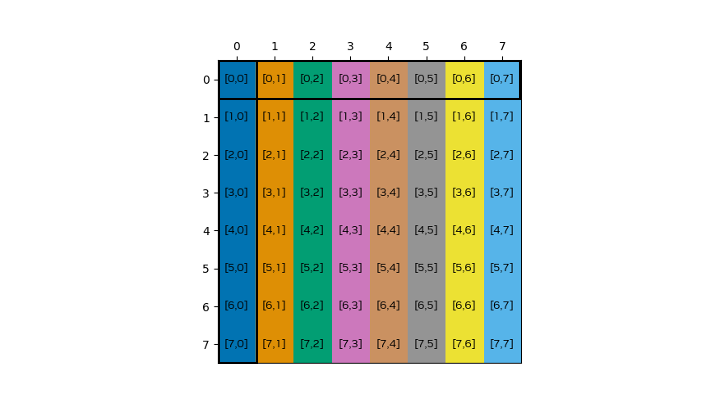
图 51在未进行重排的共享内存数据布局中,共享内存索引与全局内存索引相同。每条加载指令读取一行,并将其存储到转置缓冲区的一列中。由于转置后该列中的所有矩阵元素都落在同一存储体中,因此存储必须串行进行,产生八个存储事务,使每个存储的列都发生八路存储体冲突。
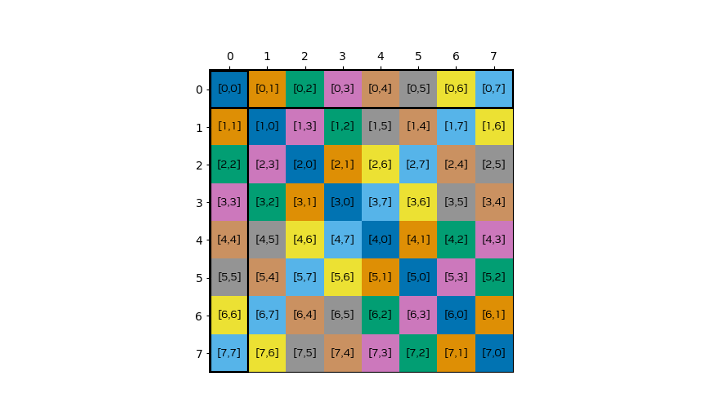
图 52采用CU_TENSOR_MAP_SWIZZLE_128B重排的共享内存数据布局。一行被存储到一列中,对于行和列而言,每个矩阵元素都来自不同的存储体,因此不存在任何存储体冲突。
__global__ void kernel_tma(const __grid_constant__ CUtensorMap tensor_map) {
   // The destination shared memory buffer of a bulk tensor operation
   // with the 128-byte swizzle mode, it should be 1024 bytes aligned.
   __shared__ alignas(1024) int4 smem_buffer[8][8];
   __shared__ alignas(1024) int4 smem_buffer_tr[8][8];

   // Initialize shared memory barrier
   #pragma nv_diag_suppress static_var_with_dynamic_init
   __shared__ barrier bar;

   if (threadIdx.x == 0) {
     init(&bar, blockDim.x);
   }
   __syncthreads();

   barrier::arrival_token token;
   if (is_elected()) {
     // Initiate bulk tensor copy from global to shared memory,
     // in the same way as without swizzle.
     int32_t tensor_coords[2] = { 0, 0 };
     ptx::cp_async_bulk_tensor(
       ptx::space_shared, ptx::space_global,
       &smem_buffer, &tensor_map, tensor_coords,
       cuda::device::barrier_native_handle(bar));
     token = cuda::device::barrier_arrive_tx(bar, 1, sizeof(smem_buffer));
   } else {
     token = bar.arrive();
   }

   bar.wait(std::move(token));

   /* Matrix transpose
    *  When using the normal shared memory layout, there are eight
    *  8-way shared memory bank conflict when storing to the transpose.
    *  When enabling the 128-byte swizzle pattern and using the according access pattern,
    *  they are eliminated both for load and store. */
   for(int sidx_j =threadIdx.x; sidx_j < 8; sidx_j+= blockDim.x){
      for(int sidx_i = 0; sidx_i < 8; ++sidx_i){
         const int swiz_j_idx = (sidx_i % 8) ^ sidx_j;
         const int swiz_i_idx_tr = (sidx_j % 8) ^ sidx_i;
         smem_buffer_tr[sidx_j][swiz_i_idx_tr] = smem_buffer[sidx_i][swiz_j_idx];
      }
   }

   // Wait for shared memory writes to be visible to TMA engine.
   ptx::fence_proxy_async(ptx::space_shared);
   __syncthreads();

   /* Initiate TMA transfer to copy the transposed shared memory buffer back to global memory,
    * it will 'unswizzle' the data. */
   if (is_elected()) {
       int32_t tensor_coords[2] = { x, y };
       ptx::cp_async_bulk_tensor(
         ptx::space_global, ptx::space_shared,
         &tensor_map, tensor_coords, &smem_buffer_tr);
      ptx::cp_async_bulk_commit_group();
      ptx::cp_async_bulk_wait_group_read(ptx::n32_t<0>());
   }

   // Destroy barrier
   if (threadIdx.x == 0) {
     (&bar)->~barrier();
   }
}

// --------------------------------- main ----------------------------------------

int main(){

...
   void* tensor_ptr = d_data;

   CUtensorMap tensor_map{};
   // rank is the number of dimensions of the array.
   constexpr uint32_t rank = 2;
   // global memory size
   uint64_t size[rank] = {4*8, 8};
   // global memory stride, must be a multiple of 16.
   uint64_t stride[rank - 1] = {8 * sizeof(int4)};
   // The inner shared memory box dimension in bytes, equal to the swizzle span.
   uint32_t box_size[rank] = {4*8, 8};

   uint32_t elem_stride[rank] = {1, 1};

   // Create the tensor descriptor.
   CUresult res = cuTensorMapEncodeTiled(
       &tensor_map,                // CUtensorMap *tensorMap,
       CUtensorMapDataType::CU_TENSOR_MAP_DATA_TYPE_INT32,
       rank,                       // cuuint32_t tensorRank,
       tensor_ptr,                 // void *globalAddress,
       size,                       // const cuuint64_t *globalDim,
       stride,                     // const cuuint64_t *globalStrides,
       box_size,                   // const cuuint32_t *boxDim,
       elem_stride,                // const cuuint32_t *elementStrides,
       CUtensorMapInterleave::CU_TENSOR_MAP_INTERLEAVE_NONE,
       // Using a swizzle pattern of 128 bytes.
       CUtensorMapSwizzle::CU_TENSOR_MAP_SWIZZLE_128B,
       CUtensorMapL2promotion::CU_TENSOR_MAP_L2_PROMOTION_NONE,
       CUtensorMapFloatOOBfill::CU_TENSOR_MAP_FLOAT_OOB_FILL_NONE
   );

   kernel_tma<<<1, 8>>>(tensor_map);
 ...
}
备注。本示例旨在展示重排的用法,其“原样”实现的性能并不好,也无法扩展到超出给定维度的情况。
说明。在数据传输期间,TMA 引擎根据重排模式对数据进行洗牌,如下表所述。这些重排模式定义了沿重排宽度排列的 16 字节数据块到每组四个存储体的子组的映射。其类型为CUtensorMapSwizzle,有四个选项:无、32 字节、64 字节和 128 字节。注意,共享内存盒的内层维度必须小于或等于重排模式的跨度。
重排模式
如前所述,有四种重排模式。下表展示了不同的重排模式,包括新的共享内存索引之间的关系。这些表定义了沿 128 字节排列的 16 字节数据块到八个子组的映射,每个子组包含四个存储体。
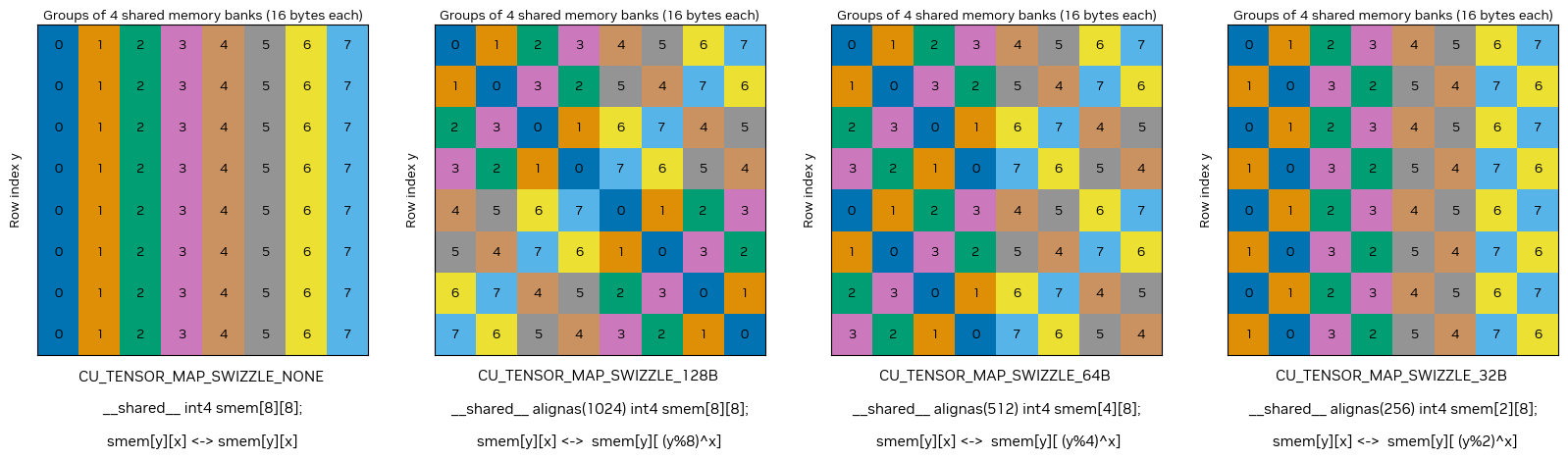
图 53 TMA 重排模式概览
图内文字中文对照
Row index y- 行索引 y
Groups of 4 shared memory banks (16 bytes each)- 每组 4 个共享内存存储体(每组 16 字节)
注意事项。应用 TMA 重排模式时,务必遵守特定的内存要求:
全局内存对齐:全局内存必须按 128 字节对齐。
共享内存对齐:为简单起见,共享内存应按重排模式重复周期的字节数对齐。当共享内存缓冲区未按重排模式自身重复周期的字节数对齐时,重排模式与共享内存之间会存在偏移。请参阅下文的说明。
内层维度:共享内存块的内层维度必须满足表 25中指定的大小要求。如果不满足这些要求,该指令将被视为无效。此外,如果重排宽度超过内层维度,请确保分配的共享内存能够容纳完整的重排宽度。
粒度:重排映射的粒度固定为 16 字节。这意味着数据以 16 字节的数据块为单位进行组织和访问,在规划内存布局和访问模式时必须考虑这一点。
重排模式指针偏移计算。这里介绍当共享内存缓冲区未按重排模式自身重复周期的字节数对齐时,如何确定重排模式与共享内存之间的偏移。使用 TMA 时,要求共享内存按 128 字节对齐。要确定共享内存缓冲区相对于重排模式偏移了多少个这样的单位,请应用相应的偏移公式。
重排模式 |
偏移公式 |
索引关系 |
|---|---|---|
CU_TENSOR_MAP_SWIZZLE_128B |
|
|
CU_TENSOR_MAP_SWIZZLE_64B |
|
|
CU_TENSOR_MAP_SWIZZLE_32B |
|
|
在图 53中,此偏移表示初始行偏移,因此在计算重排索引时,会将其加到行索引y上。以下代码片段展示了如何在CU_TENSOR_MAP_SWIZZLE_128B模式下访问重排后的共享内存。
data_t* smem_ptr = &smem[0][0];
int offset = (reinterpret_cast<uintptr_t>(smem_ptr)/128)%8;
smem[y][((y+offset)%8)^x] = ...
总结。下面的表 25总结了计算能力 9 的不同重排模式的要求和属性。
模式 |
重排宽度 |
共享内存盒的内层维度 |
重复周期 |
共享内存对齐 |
全局内存对齐 |
|---|---|---|---|---|---|
CU_TENSOR_MAP_SWIZZLE_128B |
128 字节 |
<=128 字节 |
1024 字节 |
128 字节 |
128 字节 |
CU_TENSOR_MAP_SWIZZLE_64B |
64 字节 |
<=64 字节 |
512 字节 |
128 字节 |
128 字节 |
CU_TENSOR_MAP_SWIZZLE_32B |
32 字节 |
<=32 字节 |
256 字节 |
128 字节 |
128 字节 |
CU_TENSOR_MAP_SWIZZLE_NONE(默认) |
128 字节 |
16 字节 |
4.12.3. 使用 STAS
使用线程块簇的 CUDA 应用程序可能需要在簇内的线程块之间移动小型数据元素。STAS 指令(计算能力 9.0 及以上,参见PTX 文档)支持直接从寄存器向分布式共享内存异步复制数据。STAS 仅通过libcu++库中提供的较低层cuda::ptx::st_asyncAPI 暴露。
维度。STAS 支持复制 4、8 或 16 字节。
源和目标。STAS 异步复制操作唯一支持的方向是从寄存器到分布式共享内存。根据所复制数据的大小,目标指针需要按 4、8 或 16 字节对齐。
异步性。使用 STAS 的数据传输是异步的,并被建模为异步线程操作(参见异步线程和异步代理)。这使发起线程能够在硬件异步复制数据的同时继续计算。数据传输在实践中是否异步发生取决于硬件实现,并且将来可能会改变。STAS 操作可用于发出完成信号的完成机制是共享内存屏障。
在以下示例中,我们展示如何使用 STAS 在线程块簇内实现生产者-消费者模式。此核函数创建一个环形通信流水线,其中 8 个线程块排列成环,每个线程块同时:
为序列中的下一个线程块生产数据。
消费来自序列中前一个线程块的数据。
要实现这种模式,每个线程块需要 2 个共享内存屏障,一个用于通知消费者线程块数据已复制到共享内存缓冲区(filled),另一个用于通知生产者线程块消费者上的缓冲区已准备好被填充(ready)。
#include <cooperative_groups.h>
#include <cuda/barrier>
#include <cuda/ptx>

__global__ __cluster_dims__(8, 1, 1) void producer_consumer_kernel()
{
    using namespace cooperative_groups;
    using namespace cuda::device;
    using namespace cuda::ptx;
    using barrier_t = cuda::barrier<cuda::thread_scope_block>;

    auto cluster = this_cluster();

    #pragma nv_diag_suppress static_var_with_dynamic_init
    __shared__ int buffer[BLOCK_SIZE];
    __shared__ barrier_t filled;
    __shared__ barrier_t ready;

    // Initialize shared memory barriers.
    if (threadIdx.x == 0) {
        init(&filled, 1);
        init(&ready, BLOCK_SIZE);
    }

    // Sync cluster to ensure remote barriers are initialized.
    cluster.sync();

    // Define my own and my neighbor's ranks.
    int rk = cluster.block_rank();
    int rk_next = (rk + 1) % 8;
    int rk_prev = (rk + 7) % 8;

    // Get addresses of remote buffer we are writing to and remote barriers of previous and next blocks.
    auto buffer_next = cluster.map_shared_rank(buffer, rk_next);
    auto bar_next = cluster.map_shared_rank(barrier_native_handle(filled), rk_next);
    auto bar_prev = cluster.map_shared_rank(barrier_native_handle(ready), rk_prev);

    int phase = 0;
    for (int it = 0; it < 1000; ++it) {

        // As producers, send data to our right neighbor.
        st_async(&buffer_next[threadIdx.x], rk, bar_next);

        if (threadIdx.x == 0) {
            // Thread 0 arrives on local barrier and indicates it expects to receive a certain number of bytes.
            mbarrier_arrive_expect_tx(sem_release, scope_cluster, space_shared, barrier_native_handle(filled), sizeof(buffer));
        }

        // As consumers, wait on local barrier for data from left neighbor to arrive.
        while (!mbarrier_try_wait_parity(barrier_native_handle(filled), phase, 1000)) {}

        // At this point, the data has been copied to our local buffer.
        int r = buffer[threadIdx.x];

        // Use the data to do something.

        // As consumers, notify our left neighbor that we are done with the data.
        mbarrier_arrive(sem_release, scope_cluster, space_cluster, bar_prev);

        // As producers, wait on local barrier until the right neighbor is ready to receive new data.
        while (!mbarrier_try_wait_parity(barrier_native_handle(ready), phase, 1000)) {}
        phase ^= 1;
    }
}
|
共享内存屏障由每个线程块的第一个线程初始化。屏障
filled初始化为 1,屏障ready初始化为线程块中的线程数。执行簇范围的同步,以确保在任何线程开始通信之前,所有屏障都已初始化。
每个线程确定其相邻线程块的秩,并使用它们来映射远程共享内存屏障和用于写入数据的远程共享内存缓冲区。
在每次迭代中:
作为生产者,每个线程都向其右侧相邻线程块发送数据。
作为消费者,线程 0 到达本地
filled屏障,并指示其预期接收一定数量的字节。作为消费者,每个线程都在本地
filled屏障上等待来自左侧相邻线程块的数据到达。作为消费者,每个线程都使用这些数据执行某些操作。
作为消费者,每个线程都通知左侧相邻线程块,它已使用完这些数据。
作为生产者,每个线程都在本地
ready屏障上等待,直到右侧相邻线程块准备好接收新数据。
注意,对于每个屏障,我们都需要使用正确的空间。对于映射后的远程屏障,需要使用space_cluster空间,而对于本地屏障,则需要使用space_shared空间。